




If you’re curious about improving your mobile tire shop’s bottom line by using smart scheduling & routing methods – keep reading.
I’ll show you how to decrease “windshield time”, so you can actually increase your mobile tire jobs/month capacity, while reducing fuel costs.
Bonus: I’ll go over how to turn routing and scheduling into a marketing features at checkout – an idea borrowed from the airline industry.
Let’s get into it.
Tip 1: Know The Fundamentals
Rather than throwing you in the deep end on routing & scheduling (and yes.. it can get DEEP), let’s establish some baselines – like the basic building blocks needed to get mobile tire jobs booked. Here’s the quick breakdown of the fundamental pieces:
-
Calendars for vans/techs
-
Tire Inventory Availability
-
Customer Facing Calendar widget
-
Checkout & Post Checkout flows

Calendars for Vans/Techs
Obviously there needs to be a calendar system that stores all the appointments. However, there are a few key things to consider here depending on how many mobile tire vans you operate, and who jobs are assigned to.
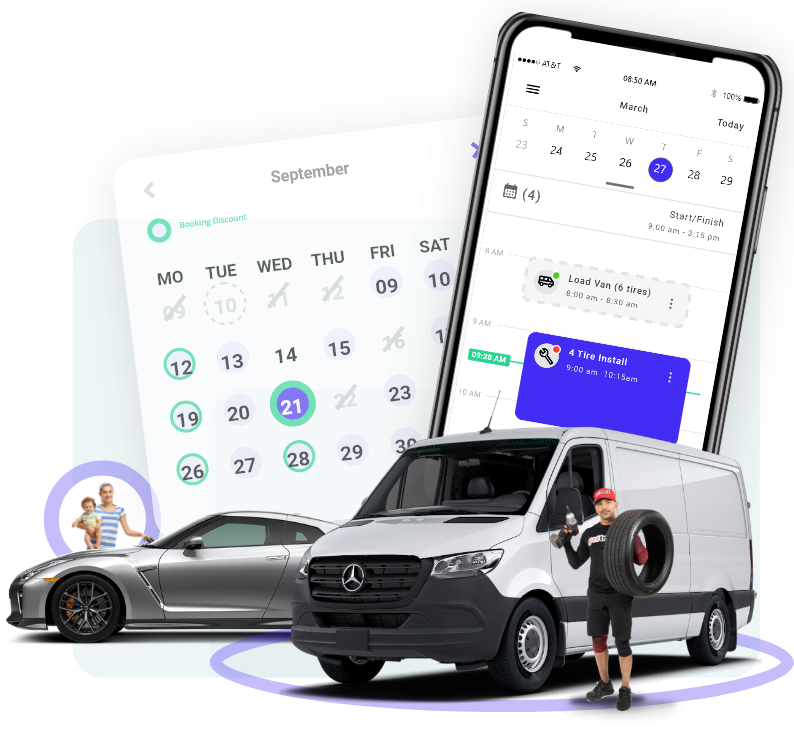
Here are the quick points:
- Calendar engine: this is the engine the stores the appointments. In software developer terms it does a lot more (Create, Read, Update, Delete)- but we’ll keep it high level for this time around.
- Assign calendar to Van or Technician: Each time a job is booked, it’ll need to be assigned to a van or technician’s calendar depending on your strategy. If technicians are always operating the same van (not swapping/sharing vans and technicians) – it doesn’t really make a difference.
- Sync Technician’s personal calendar: This is mainly for convenience so that the technician can easily block out holidays, personal events, etc – and see his tire jobs alongside his personal calendar events to avoid scheduling conflicts.

Tire Inventory Availability
Obviously, the appointment booking system needs to understand the availability of the tire in the customer’s shopping cart. This requires 3 main lego blocks:
- Tire Supplier Integrations: You’ll need full API (application programming interface) integration with ATD, TireHub, USAutoforce, NTW, and whoever else you source tires from.
- Tire Quantity and Tire Depot Location: Each supplier is slightly different, but in general they will provide parameters for each tire SKU that denotes quantity available as well as where the tire is coming from.
- Shipping Estimation: Suppliers like ATD provide parameters like “local”, “local+”, and “nationwide” as well as estimated delivery dates inside the programming data points (“endpoints”) which help software developers write their scheduling algorithms to avoid conflicts.

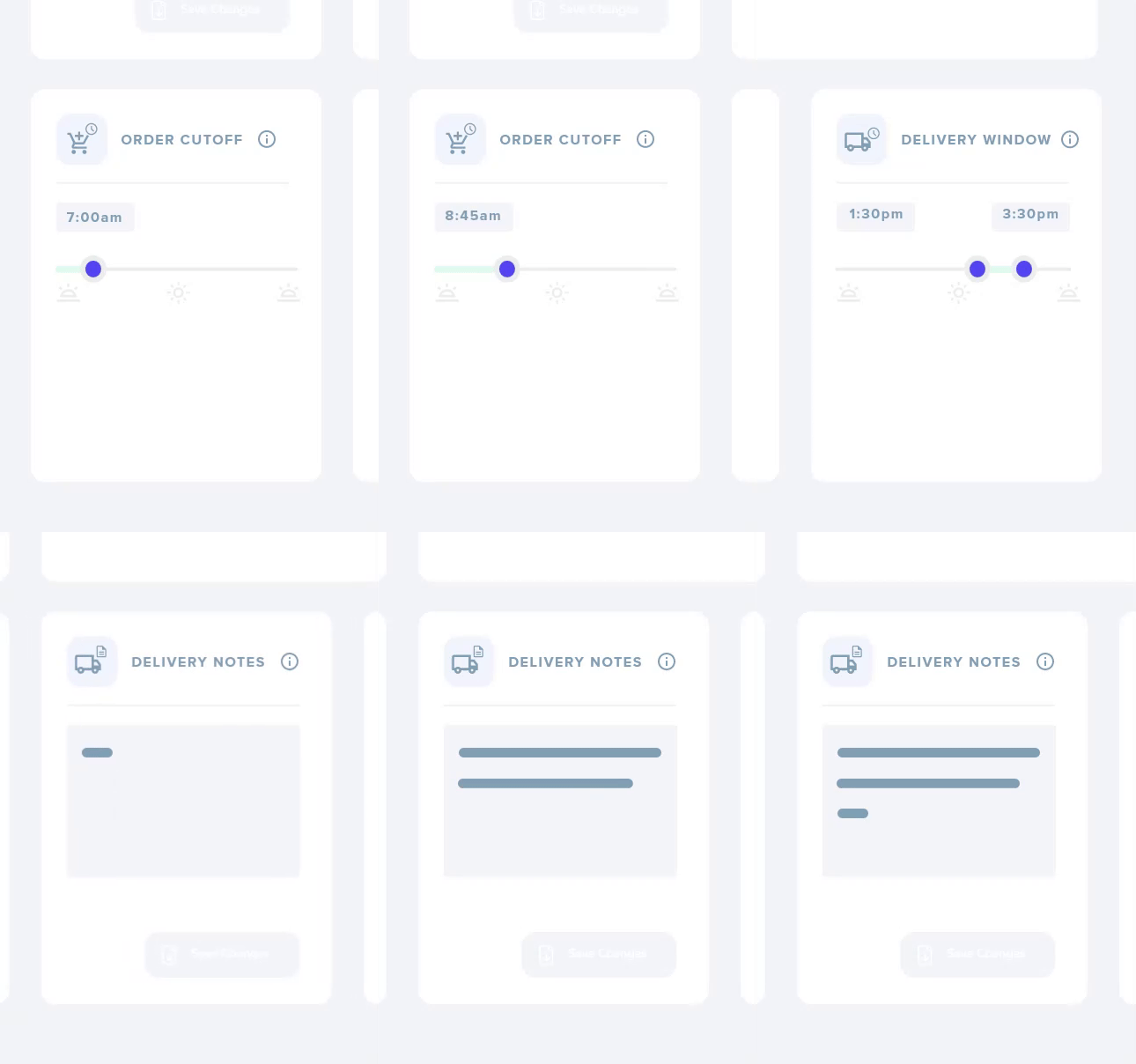
*FAILURE POINTS: If you don’t get the algorithm to take into account the tire supplier delivery schedule, as well as YOUR operation’s ability to receive the tire – it’ll cause conflicts like the following:
Tires don’t arrive on time:
- booking is for Wednesday 9AM, but the tires don’t arrive till Thursday 3pm
Customer orders AFTER the Tire Supplier Order CUTOFF:
- customer completes checkout @ 11am – but ATD order cutoff timing is already past (8am) – so order will be fulfilled NEXT day and the service scheduling needs to reflect that
When my customers ordered from the other "big sites" it was a screwup because the tire arrival and customer booking didn't align and then we had to reschedule. The customer gets upset and I look unprofessional. With TreadCommand, all that headache is gone - and we can build trust and own our customer base. Wow. Can't wait for it to launch.
—MARK D, OWNER AT CHYNE TIRE
If you’re curious to learn more about calendar/scheduling logic related to tires – take a look at this article: “How To Connect Tire Suppliers To Your Mobile Tire Shop E-Commerce”

Customer Facing Calendar Widget
Obviously there needs to be a way for the customer to choose an appointment on a calendar. Here’s the key parts:
- Must be accurate
- Needs to be easy to understand & use
- Should be mobile responsive

Checkout & Post Checkout Flows
Once the customer chooses their appointment time, the next step is actually completing the checkout by PAYING.
The client will securely pay using a card of their choice, after which the *magic happens.
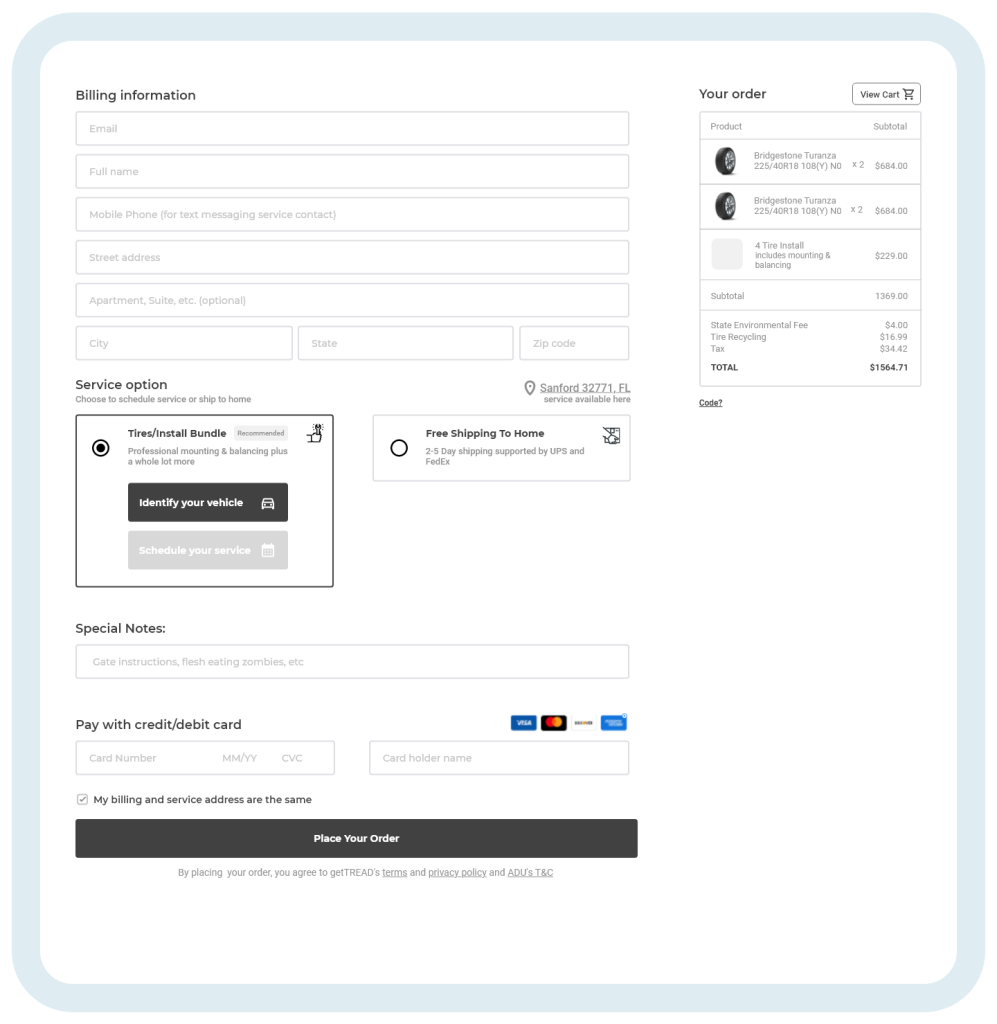
- Real-time Inventory Check confirms the tire availability at the time of payment
- If the booking slot is not longer available, the user is prompted to reselect another available time slot
- Upon appointment confirmation, the tire order gets sent to the Tire Supplier for automatic fulfillment
- Once all that is confirmed – the order confirmation is sent to the customer, and another copy of it sent to the site admin

Tip 2: Optimize the System for Your Mobile Tire Shop
Now of course, difference mobile tire shops may have different preferences on service areas, how they can to set up operating hours, and more. That’s where the operations settings are needed:
- Setting up your service territories
- Assigning Technicians/Vans
- When are their lunch breaks? Where is the start/end location?
- Widen your service area coverage with a “Round Robin” schedule
Setting up your service territories
Whether you’re operating in Los Angeles, Orlando, Dallas, or Kansas City – you’ll need to set up your service operating areas. This can be done easily by zipcode, or more complexly by a geofencing strategy.

For more about setting up service territories, check out “Defining Your Mobile Tire Shop Territories”
Assigning Technicians/Vans
When assigning Technicians for jobs, it can be done 2 ways. Assign a calendar to a technician, or a calendar to a van. Either way will work as long as it matches your strategy of organization. Regardless, the calendar that holds appointments will need the following constraints assigned:
- Assign Hours of operation
- Assign Lunch Hours
- Assign Start/End Location
With these constraints, you can optimize the online ordering so that appointments don’t conflict with your technician’s lunch hour, hours of operation, and where the technician starts and ends his day.
Clever "Round Robin" scheduling to widen your service area
You can programmatically “widen” your area of service even if you have just one mobile tire van. This allows you the benefit to serve more customers over a wider coverage area, without having to drive all across zones to accommodate those customers in different zones.
Tip 3: Utilizing FlexBookings & Smart Routing
FlexBookings
Flexbookings is a feature that TreadCommand offers to provide an arrival “time window” which can be set to be whatever duration the operator wants (2 hours, 4 hours, etc).
Basically, it tells the customer “we’ll arrive between 9am-12pm” for example.
Smart Routing
Smart Routing is a feature that TreadCommand offers to optimize the delivery route for your mobile tire vans by taking the FlexBookings and Exact bookings and algorithmically setting up the appointment arrival/departure times
Key points:
- Reduce Windshield time (reduce fuel and commute time)
- Increase daily job capacity
How it Works:
- Takes tire inventory into account
- Prioritizes Exact time appointments
- Shuffles the FlexBookings around to reduce windshield time
- Publishes the route after calculating on the batch of pending jobs

In the L.A. market - routing and scheduling can make or break the business. This should be a game changer.
—ANDREW COMRIE PICARD, FOUNDER AT ZIPTIRE.ET
Turning a logistics limitation into a "marketing" feature
Now you’re probably wondering…”don’t most people HATE when they’re given 3 hour time windows for service arrivals?”
YES…many people probably do – but there’s a silver lining and an opportunity here:
Provide a DISCOUNT for time window appointments, and regular pricing for “Exact Time” windows. Simple.
And with TreadCommand – this is all done for you. Drive sales while improving efficiencies and reducing windshield time – are you seeing the power of this? 😉


Put your Tire E-commerce on autopilot, with TreadCommand
Say goodbye to clunky & cookie-cutter tire shop management software. Grow your mobile tire shop confidently with the best-in-class automated e-commerce tire platform that customers & operators love.
Closing Remarks
Congrats!
If you’ve made it this far, you’re now better equipped than 90% of the competition out there – which puts you in a great spot to take advantage of the timing and opportunities currently in the mobile tire space.
With you new knowledge of Scheduling & Routing for mobile tire shops – it’s time for you to seize the opportunities, grow your business, & increase profits.
We believe in the mobile tire shop revolution, and we are here to BACK YOU UP!
—KALPESH GOHILL, FOUNDER/CEO AT TREADCOMMAND