


Creating a user-friendly mobile tire shop website is the cornerstone of any successful e-commerce venture. Here’s a comprehensive elaboration on the key aspects of user-friendly website design, focusing specifically on mobile tire shops.
1. Responsive Design:
Your mobile tire website must adapt seamlessly to different devices, ensuring a consistent user experience across desktops, laptops, tablets, and smartphones. Responsive design enhances accessibility and usability.
I loved the e-commerce experience...easy to purchase and schedule right from my smartphone.
—MARK T, CUSTOMER AT GETTREAD.COM

- Looks great on smartphone, tablet and desktop
- Functions great on smartphone, tablet and desktop
2. Intuitive Navigation:
Tire shoppers should easily find what they’re looking for without getting lost in a maze of links. A well-structured menu with clear categories and subcategories streamlines navigation, making it effortless for visitors to explore your site’s choices.

- Easily shop by vehicle or by tire size
- Make the vehicle list and size list easy to read on all devices

3. Fast Loading:
In today’s fast-paced world, nobody has time to wait for a slow website to load. Optimize your tire site for speed by minimizing unnecessary elements, leveraging browser caching, and compressing images. Fast loading times improve user satisfaction and reduce bounce rates (bounce rate is when a user drops off your site)
Check out this article What are Core Web Vitals and how do they affect my Mobile Tire E-commerce site to dig deeper into technical details on page speed and what affects it
4. Visually Appealing:
First impressions matter, and the visual aesthetics of your tire website play a crucial role. Invest in high-quality visuals, including images, videos, and graphics, to create an engaging and visually pleasing experience for users. A visually appealing website enhances brand credibility and encourages users to stay longer.
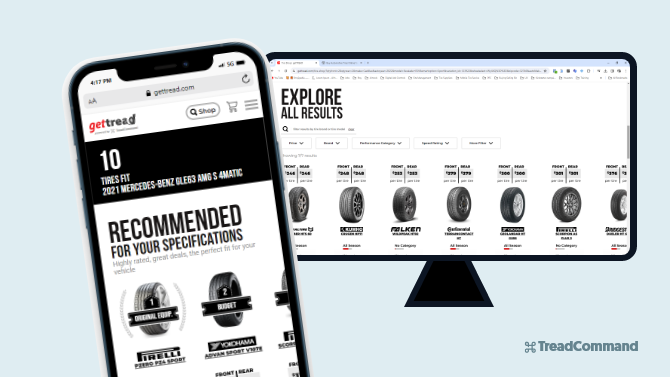
- Show the tires in a simple, easy to read and sort method
- Put the most important tire details up front, with the lesser important details shown after the user clicks on the tire thumbnail
Before getTREAD, I've never seen a tire dealer where I can SWIPE THROUGH tire choices. As someone in the IT business, I really appreciated that user experience and attention to detail.
—ERIC S, CUSTOMER AT GETTREAD.COM
5. Accessibility:
Ensure that your website is accessible to users with disabilities by adhering to web accessibility standards. This includes providing alternative text for images, ensuring proper color contrast, and implementing keyboard navigation options. An accessible website not only caters to a broader audience but also demonstrates your commitment to inclusivity
6. Clear Call-to-Action (CTA):
Guide users towards desired actions by incorporating clear and prominent CTAs throughout your website. Whether it’s “Buy Now,” “Add to Cart,” or “Learn More,” CTAs should stand out and clearly communicate the next steps for users. Well-designed CTAs streamline the user journey and drive conversions (conversions mean completed checkouts).
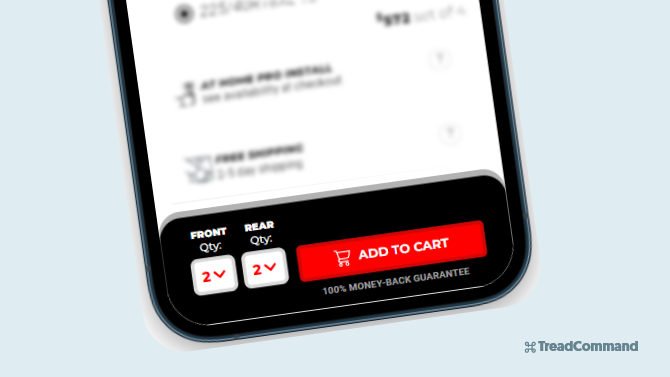
- Take advantage of “sticky footer” widgets and other ways to “direct” your user to the action that helps them convert to a sale

Put your mobile tire shop on autopilot, with TreadCommand
Say goodbye to clunky & cookie-cutter tire shop management software. Grow your mobile tire shop confidently with the best-in-class automated e-commerce tire platform that customers & operators love.
7. Optimized Search Functionality:
Implement a robust search feature that allows users to quickly find what they need in the way they’re comfortable with. This includes “Shop by Vehicle” or “Shop by Tire Size”. Include features like autocomplete, filters, and sorting options to enhance search usability. A powerful search function improves user satisfaction and encourages they land at the checkout and successfully pay for their tires.
- Make it easy for users to get to their end goal in as few clicks as possible
- Keep them informed along the process and make the steps intuitive on all devices
8. Consistent Branding:
Maintain consistent branding elements, such as colors, fonts, and logos, across all pages of your tire website. Consistency reinforces brand identity and helps users easily recognize and remember your mobile tire shop brand. Whether they’re browsing product pages or checking out, users should feel immersed in your brand experience.

- Branding plays a huge role into how your business is perceived, the trust you can establish, and the prices you can charge
- Don’t skimp on design – a little extra effort can drive more conversions and higher overall net profits
Every interaction in any form, is branding.
—SETH GODIN, MARKETING THOUGHT LEADER
9. Minimized Distractions:
Avoid cluttering your website with unnecessary distractions that may overwhelm or confuse users. Keep design elements clean and minimalist, focusing on essential content and functionality. By reducing distractions, you can create a more focused and enjoyable browsing experience for users.
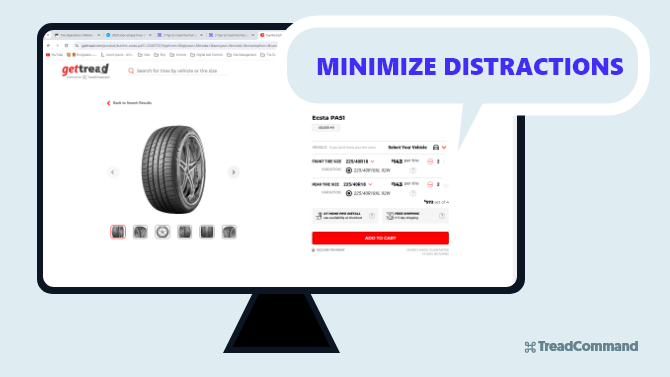
- The Add to Cart button should stand as the primary action on the tire detail page
- Maintain a color palette that clearly demonstrates PRIMARY actions with high contrast, SECONDARY actions with slightly less contrast, and less important items having a more subtle color scheme
10. Mobile Optimization:
With the increasing prevalence of mobile browsing, optimizing your website for mobile devices is essential. Ensure that your site is mobile-responsive, with touch-friendly buttons and layouts that adapt to smaller screens. Mobile optimization improves user engagement and conversion rates, especially as more users shop on smartphones and tablets.

- 60% of e-commerce is done on smartphones
- Take advantage by optimizing menus and layouts for vertical format and swiping
Put your mobile tire shop on autopilot, with TreadCommand
Say goodbye to clunky & cookie-cutter tire shop management software. Grow your mobile tire shop confidently with the best-in-class automated e-commerce tire platform that customers & operators love.
Conclusion:
Making a user friendly mobile tire shop website doesn’t need to be hard. It just requires some deep thought. With the 10 points listed, you’re on your way to making your mobile tire shop website successful.
If you’re curious about how to choose the right e-commerce platform for your mobile tire shop, check out this article: